239 lines
7.6 KiB
Markdown
239 lines
7.6 KiB
Markdown
|
||
|
||
## 项目描述
|
||
|
||
|
||
|
||
根据奔跑吧面条的**[vue-big-screen](https://gitee.com/MTrun/big-screen-vue-datav)**开源框架基础上进行修改。
|
||
|
||
- 项目需要全屏展示(按 F11)。
|
||
|
||
- 项目部分区域使用了全局注册方式,增加了打包体积,在实际运用中请使用 **按需引入**。
|
||
|
||
- 项目环境:Vue-cli、DataV、Echarts、Webpack、Npm、Node,axios,mock。
|
||
|
||
- 请拉取 master 分支的代码,其余分支是开发分支。
|
||
|
||
- 在项目public目录下存放地图数据合集,根据地市编存放。
|
||
|
||
|
||
友情链接:
|
||
|
||
1. [Vue 官方文档](https://gitee.com/link?target=https%3A%2F%2Fcn.vuejs.org%2Fv2%2Fguide%2Finstance.html)
|
||
2. [DataV 官方文档](https://gitee.com/link?target=http%3A%2F%2Fdatav.jiaminghi.com%2Fguide%2F)
|
||
3. [echarts 实例](https://gitee.com/link?target=https%3A%2F%2Fecharts.apache.org%2Fexamples%2Fzh%2Findex.html),[echarts API 文档](https://gitee.com/link?target=https%3A%2F%2Fecharts.apache.org%2Fzh%2Fapi.html%23echarts)
|
||
4. [mock.js官网](http://mockjs.com/examples.html)
|
||
5. [axios官网](https://axios-http.com/)
|
||
|
||
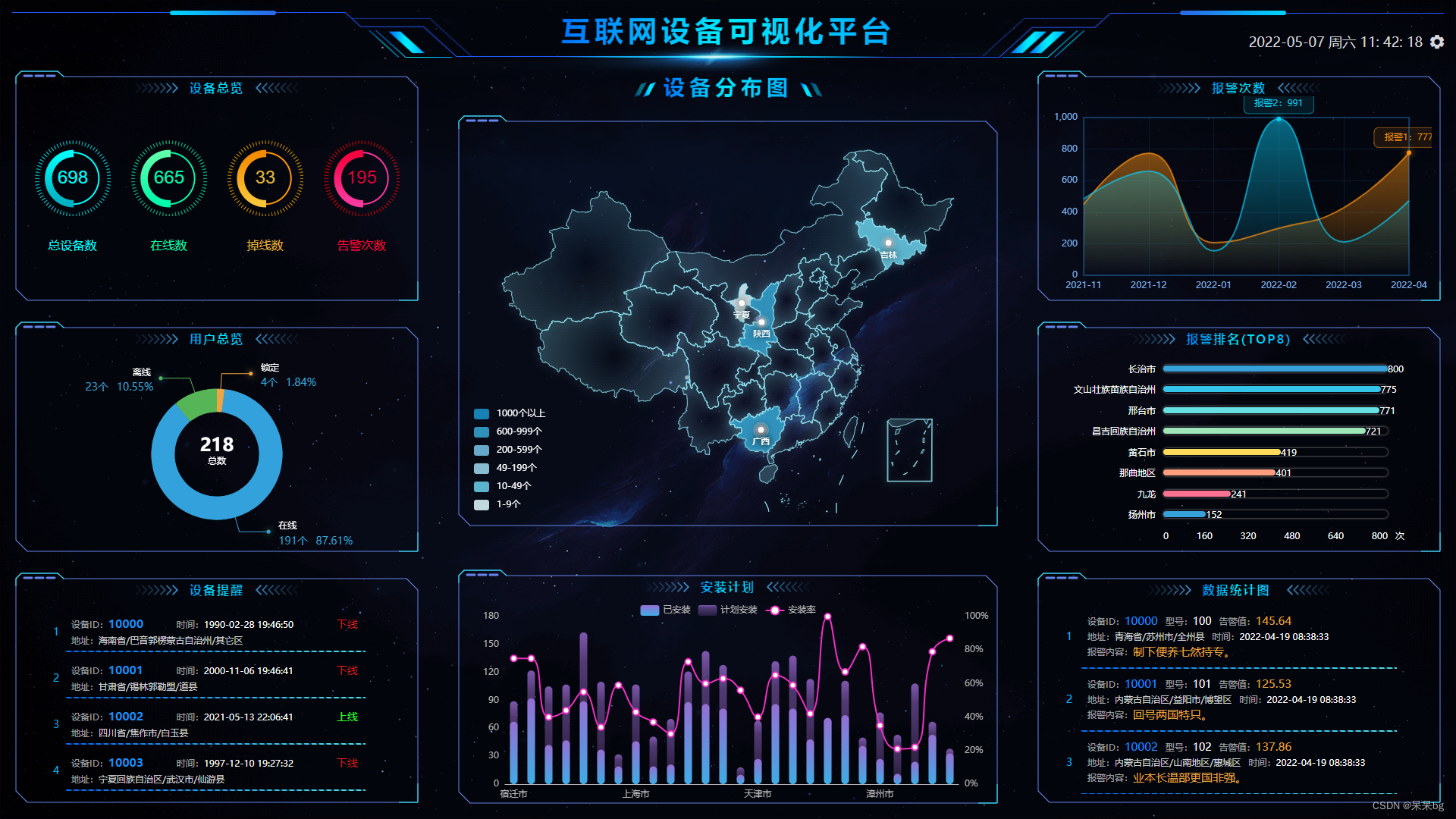
**项目展示**
|
||
|
||
|
||
|
||
### 项目预览地址
|
||
|
||
[https://www.daidaibg.com/bigscreen](https://www.daidaibg.com/bigscreen)
|
||
|
||
### 项目仓库地址
|
||
|
||
**github地址**
|
||
|
||
[https://github.com/daidaibg/IofTV-Screen](https://github.com/daidaibg/IofTV-Screen)
|
||
|
||
**Gitee地址**
|
||
|
||
[https://gitee.com/daidaibg/IofTV-Screen](https://gitee.com/daidaibg/IofTV-Screen)
|
||
|
||
### vue3+vite版本地址
|
||
|
||
**github地址**
|
||
|
||
[https://github.com/daidaibg/IofTV-Screen-Vue3](https://github.com/daidaibg/IofTV-Screen-Vue3)
|
||
|
||
**Gitee地址**
|
||
|
||
[https://gitee.com/daidaibg/IofTV-Screen-Vue3](https://gitee.com/daidaibg/IofTV-Screen-Vue3)
|
||
|
||
### 1.1.0版本开始采用自适应组件方式,不再使用mixin方式。
|
||
|
||
### 滚动设置,自适应设置
|
||
|
||
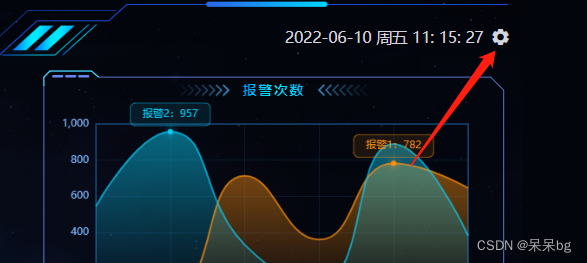
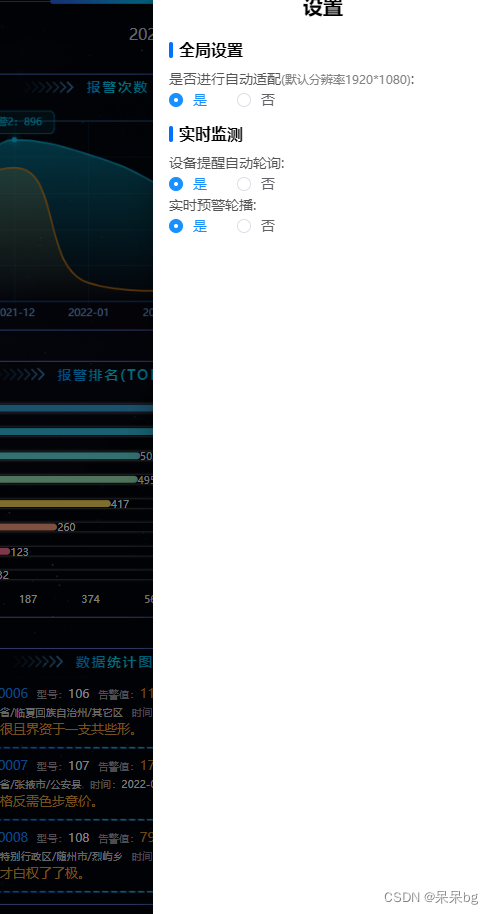
项目中可以进行滚动配置,内容是否滚动
|
||
|
||
点击右上角设置按钮
|
||
|
||
|
||
|
||
|
||
可以进行以下配置,可以自行代码中进行修改或增加配置
|
||
|
||
|
||
|
||
|
||
|
||
|
||
|
||
## 2、主要文件介绍
|
||
|
||
| 文件 | 作用/功能 |
|
||
| ----------------- | ------------------------------------------------------------ |
|
||
| main.js | 主目录文件,引入 Echart/DataV 等文件 |
|
||
| utils | 工具函数与 mixins 函数等 |
|
||
| views/ home.vue | 项目主结构 |
|
||
| views/其余文件 | 界面各个区域组件(按照位置来命名) |
|
||
| assets | 静态资源目录,放置 logo 与背景图片 |
|
||
| assets / css/ | 通用 CSS 文件,全局项目快捷样式调节 |
|
||
| components/echart | 所有 echart 图表(按照位置来命名) |
|
||
| common/... | 全局封装的 ECharts 和 flexible 插件代码(适配屏幕尺寸,可定制化修改) |
|
||
| api/api.js | 接口封装文件 |
|
||
| mock | 模拟数据接口地址 |
|
||
|
||
###
|
||
|
||
## 使用介绍
|
||
|
||
### 安装
|
||
|
||
```npm
|
||
npm install
|
||
```
|
||
### 启动
|
||
|
||
```npm
|
||
npm start
|
||
```
|
||
|
||
[接下来跟面条的差不多还是看面条的文档吧](https://gitee.com/MTrun/big-screen-vue-datav/tree/master#%E4%B8%89%E4%BD%BF%E7%94%A8%E4%BB%8B%E7%BB%8D)
|
||
|
||
https://gitee.com/MTrun/big-screen-vue-datav/tree/master#%E4%B8%89%E4%BD%BF%E7%94%A8%E4%BB%8B%E7%BB%8D
|
||
|
||
### 取消mock模拟数据
|
||
|
||
```javascript
|
||
// src\main.js文件
|
||
把下面这句话注释掉就可以了。
|
||
require('./mock/mock')//是否使用mock
|
||
```
|
||
|
||
## 自适应缩放组件
|
||
|
||
### 注意
|
||
|
||
采用Scale方式,会自动给组件父元素添加overflow:hidden
|
||
|
||
### 使用
|
||
|
||
```vue
|
||
<template>
|
||
<scale-screen width="1920" height="1080">
|
||
<div>
|
||
<v-chart>....</v-chart>
|
||
<v-chart>....</v-chart>
|
||
<v-chart>....</v-chart>
|
||
<v-chart>....</v-chart>
|
||
<v-chart>....</v-chart>
|
||
</div>
|
||
</scale-screen>
|
||
</template>
|
||
|
||
<script>
|
||
import ScaleScreen from 'scale-screen'
|
||
|
||
export default {
|
||
name:'Demo',
|
||
components:{
|
||
VScaleScreen
|
||
}
|
||
}
|
||
</script>
|
||
```
|
||
### API
|
||
| 属性 | 说明 | 类型 | 默认值 |
|
||
| ------------ | ------------------------------------------------------------ | -------------------------------- | ------ |
|
||
| selfAdaption | 是否进行自适应 | Boolean | true |
|
||
| width | 大屏宽度 | `Number` or `String` | 1920 |
|
||
| height | 大屏高度 | `Number` or `String` | 1080 |
|
||
| autoScale | 自适应配置,配置为boolean类型时,为启动或者关闭自适应,配置为对象时,若x为true,x轴产生边距,y为true时,y轴产生边距,启用fullScreen时此配置失效 | Boolean or {x:boolean,y:boolean} | true |
|
||
| delay | 窗口变化防抖延迟时间 | Number | 500 |
|
||
| fullScreen | 全屏自适应,启用此配置项时会存在拉伸效果,同时autoScale失效,非必要情况下不建议开启 | Boolean | false |
|
||
| boxStyle | 修改容器样式,如居中展示时侧边背景色,符合Vue双向绑定style标准格式 | Object | null |
|
||
| wrapperStyle | 修改自适应区域样式,符合Vue双向绑定style标准格式 | Object | null |
|
||
|
||
## 公用组件
|
||
|
||
封装了除面条外个别用到的组件
|
||
|
||
### 5.1 message消息提示
|
||
|
||
因为刚开始没想着用第三方提示库,自己简单封装了一个。
|
||
|
||
注:组件内部目前只有warning,类型,如果需要其他类型自己组件内添加。
|
||
|
||
因在main.js注册全局可以直接使用,不需要引入
|
||
|
||
```js
|
||
this.$Message({
|
||
text: res.msg,
|
||
type: 'warning'
|
||
})
|
||
//也可以这样
|
||
this.$Message.warning(res.msg)
|
||
```
|
||
|
||
| 参数 | 描述 | 默认值 | 类型 | 可选值 |
|
||
| :--: | :------: | :-----: | :----: | :-----: |
|
||
| text | 提示文字 | - | string | - |
|
||
| type | 弹窗类型 | warning | string | warning |
|
||
|
||
### 5.2 外边框
|
||
|
||
因为我的项目外边框几乎一样,还有title,所以封装了此组件。
|
||
|
||
根据自己需求更改,更换外边框(src\components\item-wrap\item-wrap.vue)下更换。
|
||
|
||
```vue
|
||
<ItemWrap
|
||
title="我是title"
|
||
>
|
||
<div>我是谁?</div>
|
||
</ItemWrap>
|
||
```
|
||
|
||
| 参数 | 描述 | 默认值 | 类型 | 可选值 |
|
||
| :---: | :--: | :----: | :----: | :----: |
|
||
| title | 标头 | - | string | - |
|
||
|
||
## 中间地图
|
||
|
||
### 南海显隐控制
|
||
|
||
根据需求来,**修改此值请刷新页面**
|
||
|
||
```indexs/center-map.vue``` 文件中```isSouthChinaSea```变量 默认不显示南海(false),为```true```的时候显示南海
|
||
|
||
```
|
||
isSouthChinaSea:false,//默认不显示南海,改为true可显示南海
|
||
```
|
||
|
||
## 全局参数
|
||
|
||
### filter
|
||
|
||
监测数据项统一过滤,保留两位小数。
|
||
|
||
```vue
|
||
{{10.23123|montionFilter }}
|
||
```
|
||
|
||
## 大屏交流反馈(面条的群)
|
||
|
||
### 大屏QQ群
|
||
|
||
QQ群号:713105837
|
||
|
||
### 大屏二维码
|
||
|
||
QQ群二维码:
|
||
|
||

|
||
|